Repair Corrupted ZIP and WinZip Archives on Windows

Extract surviving files and complete folder trees from damaged .zip and self-extracting .exe archives directly on your Windows PC. Recovery Toolbox for Zip performs an independent top-down byte scan to bypass broken archive indexes, letting you browse recoverable folders and verify file integrity for free before saving anything to disk.

  • Operating System: Microsoft Windows 11, 10, 8.1, 8, 7, and Windows Server (with backward compatibility down to Windows XP/2000/98). Engineered strictly for desktop and laptop PCs; not designed for mobile devices.
  • Archive Types Supported: Standard .zip archives, WinZip archives, large ZIP64 containers exceeding 4 GB, and corrupted self-extracting (.exe) archives.
  • Free Diagnostic Mode: Unlimited free scans and full folder-tree preview before purchasing a registration key.
  • Non-Destructive Engine: Strictly read-only scanning that leaves your original damaged archive untouched.

Recovery Toolbox for Zip

Download free demo & viewer

Installer: RecoveryToolboxForZipInstall.exe | Native Windows Desktop Utility

By downloading, you agree to the Terms and EULA.

Windows 11

Engineered by data recovery expert Victor G. Bobrov

100% SecureNortonVirusTotalWindows®
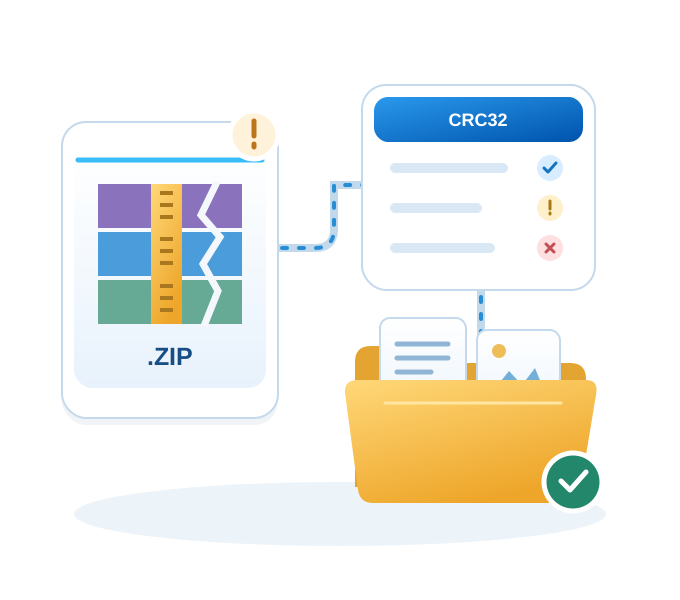
A damaged ZIP archive is scanned by Recovery Toolbox and its readable files are extracted to a folder.

Repair Corrupted ZIP and WinZip Archives on Windows

Updated: 2026-11-11

Victor Bobrov Written by:

30-Second Pre-Check: Verify If Your Corrupted ZIP Contains Recoverable Data

Before installing any repair tool, check four physical properties of your broken file in Windows File Explorer to confirm that extractable data streams exist inside the container:

  1. Confirm file size is above 0 KB: Right-click the archive and open Properties. A file showing 0 bytes contains no payload to recover. For a nonempty file, size alone cannot tell you which entries survived.
  2. Check retained size on interrupted downloads: Because ZIP archives write entries sequentially from start to finish, a 4 GB download that dropped at 75% (3 GB on disk) still holds the complete binary streams for the first 3 GB of files.
  3. Gather all split volumes into one folder: For multi-part archives (.z01, .z02, ..., .zip), place every volume segment into the same local directory before launching a scan.
  4. Verify whether the file is a renamed Office document: Modern Microsoft Office files (.docx, .xlsx, .pptx) are actually ZIP containers holding XML data. If an Office file is corrupted, scanning it as a ZIP archive can recover raw text (document.xml) and embedded media images.

ZIP Error Diagnostic Matrix: Why Windows Fails While Your Files Survive

A ZIP archive records file information in two separate locations: Local File Headers placed immediately ahead of each individual compressed file stream throughout the archive, and a master index called the Central Directory appended at the very end of the file.

Built-in Windows extraction (zipfldr.dll) and standard archivers read archives from the bottom up. They jump to the end of the file to read the End of Central Directory Record (hex signature 50 4B 05 06). If the tail of the archive is missing or corrupted, Windows blocks the entire archive—even when 99% of the individual Local File Headers (hex signature 50 4B 03 04) and compressed data streams inside the file remain completely intact.

Error MessageWhat Is Broken Inside the ZIPRecovery ForecastRecovery Toolbox Mechanism
Compressed folder is invalidDamaged or missing Central Directory tail80–100% of intact streamsScans Local File Headers from byte zero
Not a valid archiveCorrupted start signature or broken tail indexHigh for interior entriesBypasses master index via raw signature search
Unexpected end of archiveIncomplete download or cut-off transfer100% of entries before cutoffExtracts all complete streams preceding the break
CRC failed / Checksum errorBit-flip inside a file stream or wrong passwordHealthy files: 100%; bad file: partialIsolates corrupted stream and saves healthy files
Cannot find local header / Error 42125Damaged local entry metadataMedium to HighReconciles boundaries via surviving directory records
Archive too large / 4 GB limit32-bit header overflow (>4 GB or >65,535 files)HighParses 64-bit offsets and reconstructs tree
  • Why a single CRC error does not ruin the entire archive: Unlike solid archives that compress all files into one continuous dictionary block, standard ZIP archives compress each file independently. If one file suffers a bit-flip and fails its 32-bit cyclic redundancy check (CRC-32), Recovery Toolbox for Zip isolates that damaged entry and extracts all remaining intact files without interruption.

Desktop Windows Software vs. Browser ZIP Repair: Which Tool Fits Your Scenario?

Browser-based WebAssembly parsers are convenient for tiny, non-confidential archives containing a few flat files. A native Windows executable becomes necessary when archive size exceeds browser memory limits, when thousands of files sit inside deep folder trees, or when strict offline security is required.

Selection CriterionRecovery Toolbox for ZipBrowser Online ToolsCommand Line (zip -FF)
Maximum File SizeUnlimited (handles multi-GB ZIP64)Capped by browser tab RAM (~2–4 GB)Unlimited
Nested Folder TreeRestores complete hierarchy in one passOften requires manual per-file savingRestores tree if flags succeed
Data Confidentiality100% offline local disk executionBrowser memory sandbox or cloud upload100% offline local execution
Corrupted SFX (.exe)Supported directlyRejected by upload filtersRarely supported
User Skill LevelVisual Windows wizard with preview treeDrag-and-dropTerminal commands and hex logs
  • Use a browser utility when: Your archive is under 100 MB, contains non-sensitive files without complex subfolders, and you are working on a non-Windows device.
  • Use Recovery Toolbox for Zip when: Your archive is several gigabytes in size, contains hundreds or thousands of files organized in deep directories, holds confidential corporate or personal records that cannot touch a browser or cloud server, or is a broken self-extracting .exe file on Windows.

How to Preview and Extract Surviving Files in 3 Steps (Free Viewer vs. Full Version)

Run RecoveryToolboxForZipInstall.exe on your Windows PC and follow the three-stage verification workflow:

Step 1. Launch a Read-Only Byte Scan on the Damaged Archive

Select the corrupted .zip or self-extracting .exe file from your local drive or network share and click Next. The engine performs multiple passes over the raw byte stream, matching surviving Local File Headers (50 4B 03 04) against Central Directory records (50 4B 01 02) and recalculating CRC-32 checksums.

Select a damaged ZIP archive

Step 2. Verify the Folder Tree, Check the "!" Indicator, and Select Target Files

When the scan finishes, inspect the reconstructed folder tree and file list directly inside the preview window:

  • Confirm survival before paying: Expand nested directories to verify exact file names and uncompressed sizes.
  • Use selective extraction for speed (the "!" marker): The blue exclamation mark (!) identifies entries the program considers recoverable. Use the checkboxes to select just the files or folders you need from a large archive.
Select files in the recovered folder tree

Step 3. Extract to a Short Root Path and Audit the Recovery Log

Select an output folder on a healthy drive and start the extraction.

  • Follow the Short Root Path rule: Always extract deeply nested archives into a short root directory such as C:\Recovered or D:\ZipOut instead of a deep Desktop or Downloads subfolder. This prevents Windows from dropping deeply nested files that exceed the classic 260-character path limit (MAX_PATH).
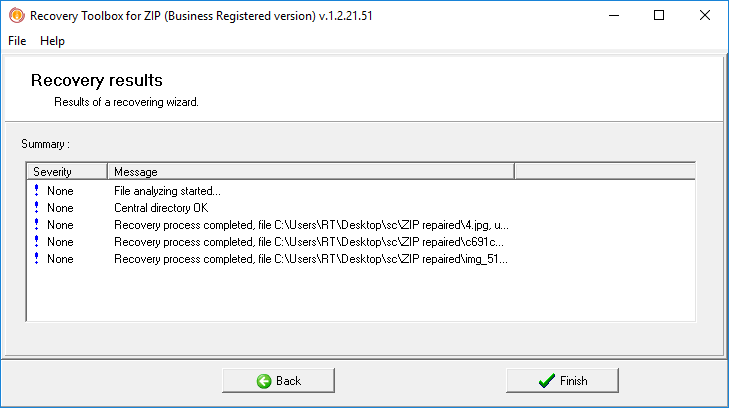
  • Audit the final Recovery Log: On the completion screen, review the item-by-item report classifying every file into one of three states: Saved intact (passed full decompression and CRC-32 check), Saved with warnings (partially salvaged stream), or Not saved (stream physically missing or overwritten).
Review the ZIP extraction log

What You Can Do in Free Preview Mode vs. Full Registered Version

  • Included in the Free Demo (Unlimited ZIP Viewer Mode): Open any number of corrupted .zip and SFX .exe files, run the full multi-pass byte and CRC-32 analysis, and browse the complete reconstructed directory tree and file list to verify that your critical files survived.
  • Unlocked in the Full Registered Version: Export and save the selected files and folder structures from the preview tree onto your local hard drive or network storage.

Hard Technical Limits, Compression Behavior, and 3 Mistakes to Avoid

Whether an individual damaged file inside a ZIP container can be recovered intact or partially depends on how that entry was originally stored and what kind of physical damage occurred.

How Compression Type Affects File Survival

Entry Storage TypeHow Data Is StoredImpact of a Single Bit-FlipRecovery Outcome
Stored (Method 0)Uncompressed raw bytesAffects only the exact damaged byteHigh (file extracts with minor local glitch)
Deflated (Method 8)LZ77 sliding dictionary + HuffmanBreaks decompression downstream of errorHealthy neighbors: 100%; damaged file: partial
ZipCrypto (Known Password)Stream cipher over compressed dataCorrupts stream from error offset onwardRecoverable up to damaged block with password
AES-128 / AES-256 (No Password)Strong block encryptionBlocks payload decryption completelyFile names visible in header; payload locked

Why uncompressed media inside ZIPs often survive best: JPEGs, MP4s, and pre-compressed documents are frequently added to ZIP archives using Stored (Method 0) mode without secondary compression. Because no sliding dictionary is used, Recovery Toolbox for Zip can extract these streams directly via header offsets without cascading decompression failure.

Hard Disqualifiers: When No Software Can Recover a ZIP File

  • Zero-byte files (0 KB): An empty file entry on disk holds no binary payload to scan.
  • Sectors overwritten with zeroes or garbage: If an archive resided on a dying SSD, HDD, or flash drive where bad blocks were remapped to 0x00 bytes, the missing data inside those blocks no longer exists in the archive file.
  • Encrypted streams without the password: Repair utilities reconstruct damaged container structures; they do not bypass AES encryption without the user's password.
  • Mobile operating systems: This software runs exclusively on Microsoft Windows computers and cannot be installed on Android phones, iPhones, iPads, or macOS without a Windows environment.

3 User Actions That Permanently Destroy Recoverable ZIP Data

  1. Opening and saving a corrupted .zip in Notepad or WordPad: Text editors replace non-printable binary bytes with character encoding symbols upon saving, instantly destroying every 50 4B 03 04 header signature across the entire archive.
  2. Running in-place terminal repairs without an output copy: Executing console repair flags directly on the original damaged archive without creating a separate copy first can truncate surviving interior streams if an offset calculation fails.
  3. Saving extracted files back onto a failing USB drive or disk: If your archive became corrupted because a flash drive or external disk is developing bad sectors, writing recovered files back to that same drive risks immediate re-corruption. Always extract to a separate healthy drive.

Troubleshooting & Edge-Case FAQ

Can I recover files from a split multi-volume archive (.z01, .z02, .zip) if one part is missing?

Yes, partially. Because standard ZIP archives compress each file independently, files stored entirely within the surviving volume parts can still be located via byte-level header scanning and extracted, whereas files that spanned across the missing volume segment will be incomplete.

Can Recovery Toolbox for Zip extract data from a corrupted .docx, .xlsx, or .pptx file?

Yes, if you rename the damaged Office document extension to .zip and scan it. You can extract the internal XML streams (such as word/document.xml for text or the media folder for original images). However, if you need the document rebuilt into a ready-to-open Word or Excel file automatically, use a dedicated Office repair tool instead.

Why can I see file names inside a password-protected ZIP during the scan, but cannot open the extracted files without a password?

The classic ZIP specification leaves file names, timestamps, and folder paths unencrypted inside the Local File Headers and Central Directory so archivers can list contents quickly. Recovery Toolbox for Zip reads these unencrypted headers to show you the folder tree, but the compressed data stream itself remains encrypted and requires your password.

Why does a multi-gigabyte archive take several minutes to finish scanning?

Unlike Windows Explorer, which only reads a few kilobytes at the end of the file, Recovery Toolbox for Zip reads every byte of the archive from start to finish across multiple passes and recalculates CRC-32 checksums for every discovered file. On archives over 10 GB or slow USB drives, allow the progress bar to complete without closing the window.

Recovery Toolbox for ZIP

By clicking Download, you agree to the Terms of Service and EULA.

Real customer reviews from TrustPilot

Victor G. Bobrov, Senior Software Engineer.

MCSD, MCDBA

An expert in the field of storing and recovering files from damaged ZIP archives with over 20 years of experience and qualifications.

Customer's reviews and ratings:
Saeed Badr 09-30-2026

very good

Julio 08-31-2026

Excellent program, thank you.

Shekhar 02-21-2026

Have to be with me for the same thing with

Carmen Calzadillas 02-17-2026

So what happened was that I was downloading files from my drive and deleting them so I would have more storage space. I downloaded the folder "2022" and after it was downloaded in my computer I proceeded to delete it in drive (also from the trash bin). When I tried to open the folder in my computer it said that it was damaged, and I had no way of retrieving the folder since I had already deleted it from the original source.

amit 01-02-2026

helpfull

bala 12-17-2025

one imp file showed as error not saved

ansh 10-10-2025

it is slow rest is fine

ashish 09-06-2025

very good experience .sometime it works slow but ,great job.

Muly1680 05-22-2025

awsome..its great tools
thank you..

atul 01-12-2025

YOU SAVE MY MEMORY. I RECOVERED MY 20 YEAR OLD CD DATA VIA THIS SOFTWARE

yanina 01-07-2025

Very good app

jkis 12-12-2024

good app

Alan 08-11-2024

I'm not actually sure how the zip file got corrupted. It had been stored on google drive for a long time and turned out to be corrupt when I tried to use it.

Either it was copying it from the computer to google drive or it may have been caused by some very long filenames causing the zip to be corrupted when it was created.

However, I was able to get the files I needed back from the zip, so the outcome was successful 😊

Armandoruggieri@mail.com 07-22-2024

Optimal

gdhhshrh 05-30-2024

It recovered my video as much as possible. I think the main goal of this software is to recover to the fullest extent and at least allow the disc-reader to read through the whole file. This is not some magic tool and parts that are too damaged will be replaced with grey color(not fully). It took me incredibly long for 1 GB file(about 2 days) where only about 30-40 seconds were damaged(I was really impressed by the speed of going through not damaged parts-even my reader couldnt read that fast; 90% of the time has gone to recovering that seconds). Overall, I'm happy with the results as I didnt care about the damaged parts, my main goal was to download the file which I couldnt do before. It's the only software I've tried so I cant really tell how good this software has done compared to others

Mohad 05-28-2024

this program is verry good

Yazid Hariz 03-25-2024

It has been damaged when zipping the file. it's a video from Iphone.

Jordi 01-25-2024

The zip file was damaged and I don'k know why. It has been already recovered, but the problem was that, after testing it with your demo, I bought the license and after register the software with your license, it was required to reboot the software, so I had to start again the recovery.
As a computer's technical and adivsor, I'm user of a lot of software for several works and always use a demo before purchasing the license (if it looks that works, of course), and from the demos version, after registering the license, it is not required to reboot the software, so I can continue with the data recovery (or whatever it needed) without loosing the time invested in checking the software. In your case, I had to start again the recovery, so it means that I loost a lot of time because of the need of restart your software after registering the purchased license.
So I guess that it would be interesting change this behaviour of your software after buying the license in demo cases. Best regards, Jordi

Василий 08-12-2020

The program helped me a lot.
5+

Толстая Мышь 06-07-2018

Files from the damaged archive were extracted. But the scan was VERY long.

DAVEFRENCIS 05-18-2018

All my crashed by viruses zip archives were restored for a moment. But tool doesn't support huge files.

DEANMORGAN17 05-18-2018

Software helped me to recover zip archives. But some errors shows during parsing corrupted zip files.

Download Buy Now
By clicking Download, you agree to the Terms of Service and EULA.